
Error: Insufficient Balance Print
Modified on: Fri, 30 Jan, 2026 at 12:35 PM
×
⚠️ Article no longer maintained ⚠️
For more details, refer to the official annoucenment.
This article remains available for reference but is no longer updated or maintained.
Please use the information at your own discretion and risk.
For more details, refer to the official annoucenment.
If you encounter the error 'balances.InsufficientBalance', it means you are trying to send all of your transferable funds out without leaving a small transferable balance for the transaction fees. This is what the "insufficient balance" refers to: there's not enough balance left to pay the transaction costs.

The fee is shown on the transfer screen before you confirm the transfer. Deduct this amount from the total amount you're sending out, and your transfer will go through.
You can see an example here:
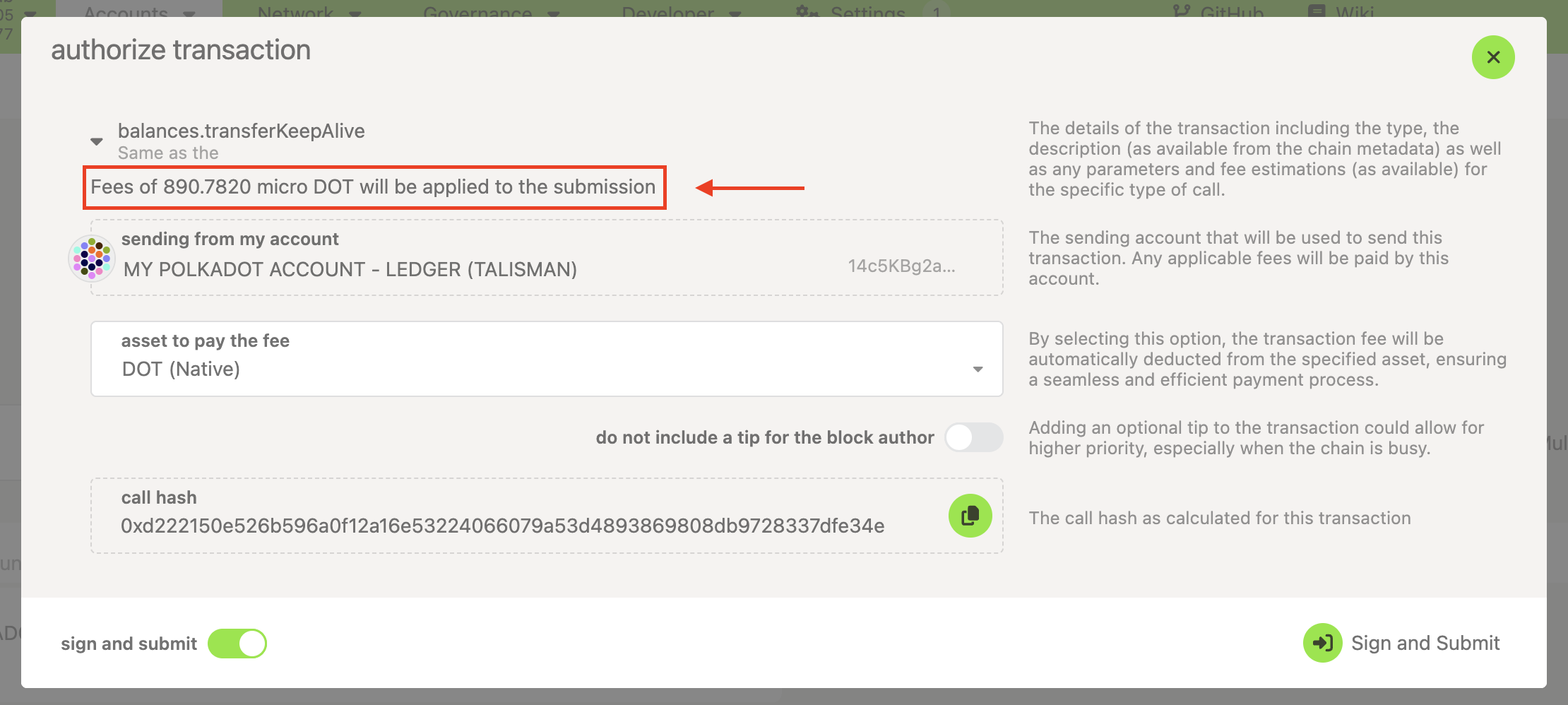
890.7820 microDOT = 0.000890782 DOT
However, if you want to send all your funds out, you can indicate it from the Polkadot Developer Interface and leave the system to deal with the transaction. Follow the steps described in the article "Polkadot Developer Interface: How to Send All of Your Funds Out of Your Account."
If you are more of a visual learner, check the video about how to transfer funds out of your account at the mark 3:01:
Transfer your Funds using Ledger Nano, Parity Signer, Polkadot-JS UI & Browser Extension
