
Talisman Wallet: How to View Your Transaction History Print
Modified on: Wed, 7 May, 2025 at 2:12 PM
×
⚠️ Article no longer maintained ⚠️
For more details, refer to the official annoucenment.
This article remains available for reference but is no longer updated or maintained.
Please use the information at your own discretion and risk.
For more details, refer to the official annoucenment.
This article explains how to view the most current activity from any accounts in your Talisman Wallet.
ℹ️ GOOD TO KNOW

If you have any questions about Talisman or run into any issues and require further assistance, feel free to ask our AI chatbot or contact us.

Alternatively, you can join Talisman's Discord server and receive specialized assistance from the team that developed the wallet. This communication channel is also an important feedback loop for the Talisman team to improve the wallet, and they always appreciate hearing from users.
1. Open your Talisman Wallet.
2. Click on the "History" icon at the bottom of the screen:
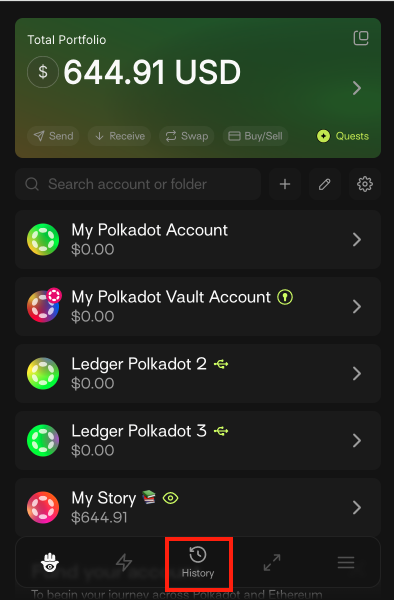
3. On the new screen, you'll see the transactions from all the accounts submitted from your Talisman Wallet:
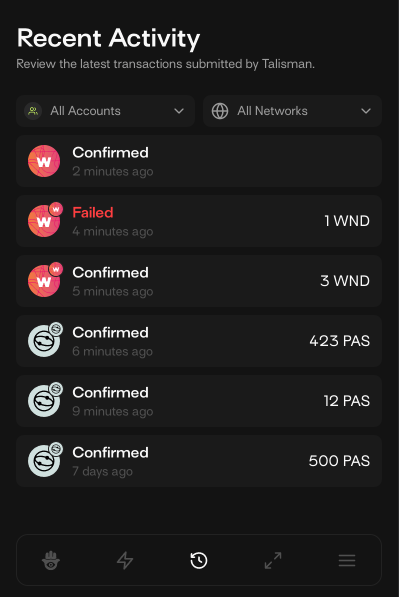
ℹ️ GOOD TO KNOW

The transaction history in the Talisman Wallet displays all transactions, and you can delete any of them if you wish.

If you want more information about a specific transaction, hover over it and click the three dots on the right, from there, you can view it on a block explorer.
